More connections. Less waiting.
Split supported file downloads across multiple connections. FID adjusts to what the server supports and can fall back to one connection.
Your next download, upgraded
Meet FID. A native Windows download manager that keeps your files, videos, and queues moving—on your terms.
Files. Videos. One organized place.

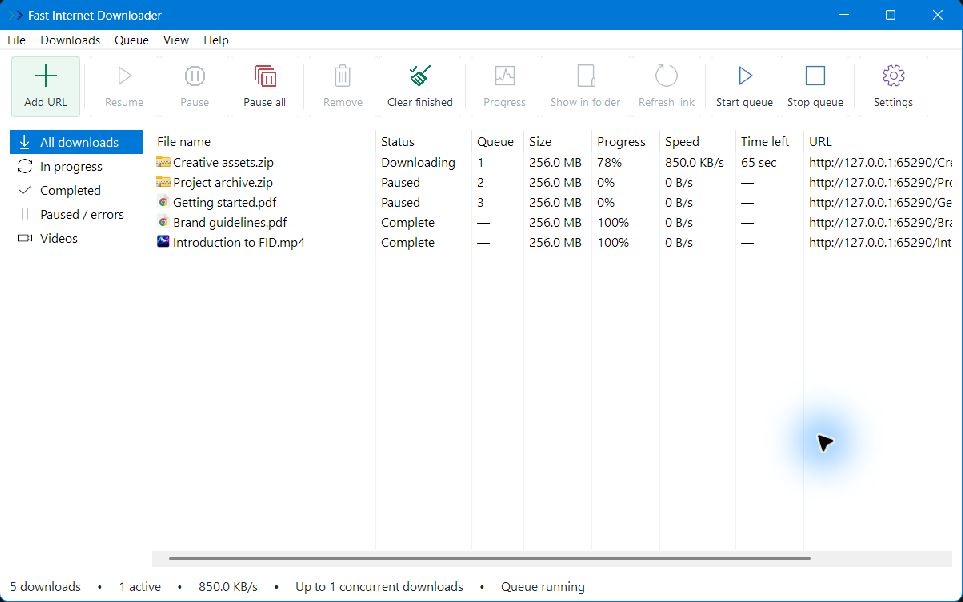
A familiar place for every file
Small details. A better download.
A big file, a saved video, a queue for later. FID gives you the right controls without getting in your way.
Split supported file downloads across multiple connections. FID adjusts to what the server supports and can fall back to one connection.
Pause a transfer without losing your place. FID checks saved parts before resuming, so a changed source file doesn’t silently become a broken download.
Choose what comes next. Reorder downloads, set simultaneous limits, and keep your connection from being overwhelmed.
Capture browser downloads, send a link from the context menu, or choose a video from the extension popup. You control the handoff.
Save supported videos or audio and choose from the available qualities. Use the browser’s video button or paste a page link into FID.
Recover from an expired link. Get a replacement from the original page or paste it yourself, then reuse saved file parts when they still match.
A closer look, whenever you need it
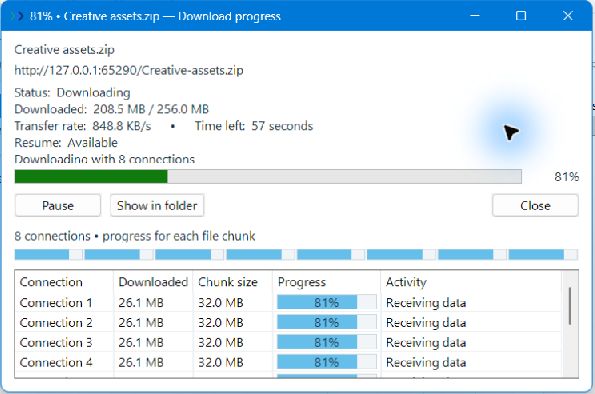
Open a download to see the whole picture: speed, time remaining, and progress for each file connection. A compact window keeps the details close, without taking over your desktop.
From link to local, in three steps
Paste a file or video URL into FID, or hand it over from the Chrome extension.
Choose a name and folder. Start now, or save the download in your queue for later.
Check progress, pause when you need to, and find your finished file in a click.
Your next file. Your next video. Your next big idea.