
How to download multiple links at once
Import up to 5,000 links in FID Pro. Review URLs, choose a destination, handle duplicates and start a batch download on Windows.
FID Pro’s bulk downloader brings multiple file or video links into one review screen. It is useful for a set of project archives, documents or supported video pages.
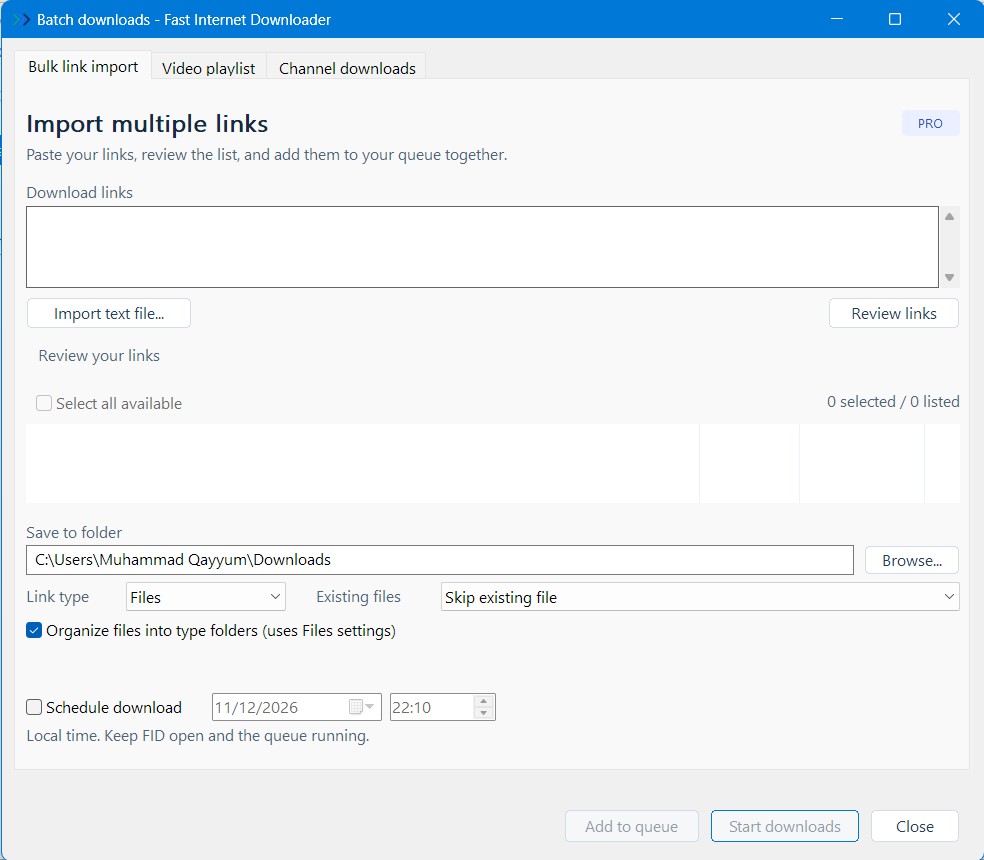
Import and review your links
- Choose Batch → Bulk link import, or use File → Import multiple links.
- Paste one URL per line, or select Import text file for a UTF-8 text file. A batch can contain up to 5,000 links.
- Select Review links. Check the list for invalid and duplicate entries, then select the links you want.
- Choose Files for direct file links or the video link type for supported video pages.
Choose the folder and download behavior
Set a destination and choose how to handle existing files. Type folders can organize files using your Files settings. Select Add to queue to keep the batch for later, or Start downloads to begin.
Schedule a batch
Enable Schedule download and select a local date and time. FID and the queue must remain running at that time. See download scheduling.
What the preview checks
The review screen checks link format and duplicates. Final filenames, availability and server behavior are checked during download. A valid URL is not a guarantee that a file is still available.
Bulk downloads require FID Pro. To extract videos from a collection URL, use the playlist downloader.