
How to download a video playlist on Windows
Preview playlist videos, choose a quality, save available subtitles and number your files in order with FID Pro for Windows.
The FID Pro playlist downloader lets you choose the videos you need before starting a supported public playlist. Set one quality and destination for the selection.
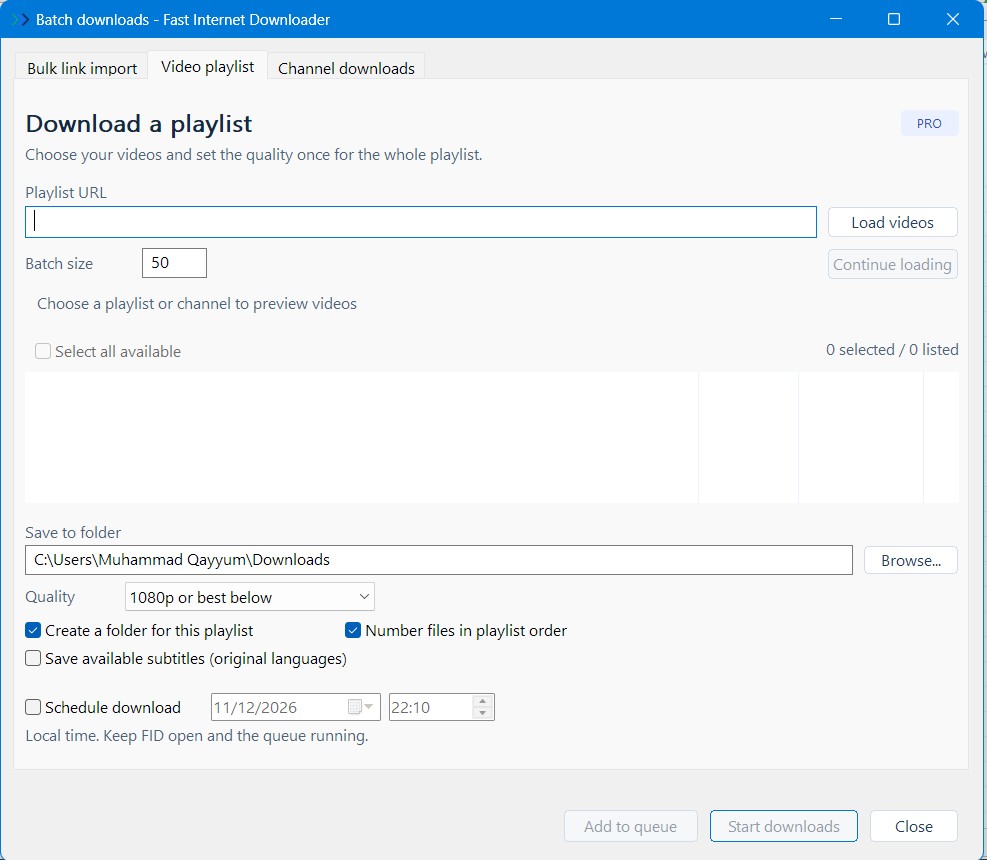
Load and select playlist videos
- Open Batch → Video playlist.
- Paste the playlist URL and choose a batch size, then select Load videos.
- FID loads successive batches with thumbnails where available. You can stop loading and continue later.
- Select individual available videos, or choose Select all available.
Choose quality, subtitles and file order
Select an available quality and a save folder. Enable Create a folder for this playlist to keep the collection together, and Number files in playlist order to preserve its sequence. You can also save available subtitles in their original languages.
Start now or schedule the playlist
Select Start downloads or Add to queue. For a future start, enable the scheduling option. Keep FID open and its queue running when the scheduled time arrives.
Why some videos may be unavailable
Private, deleted, restricted or unsupported entries may not be downloadable. Resolution and subtitles depend on the source. DRM-protected media is unsupported. Download content you own or have permission to save.
For future uploads from a creator, use channel watches. Compare everything included in FID Pro.