
Download channel videos and follow new uploads
Save selected channel videos or automatically check for new uploads with FID Pro channel watches on Windows.
Use FID Pro to download selected videos from a supported public channel. A saved channel watch can check for new uploads while the app runs.
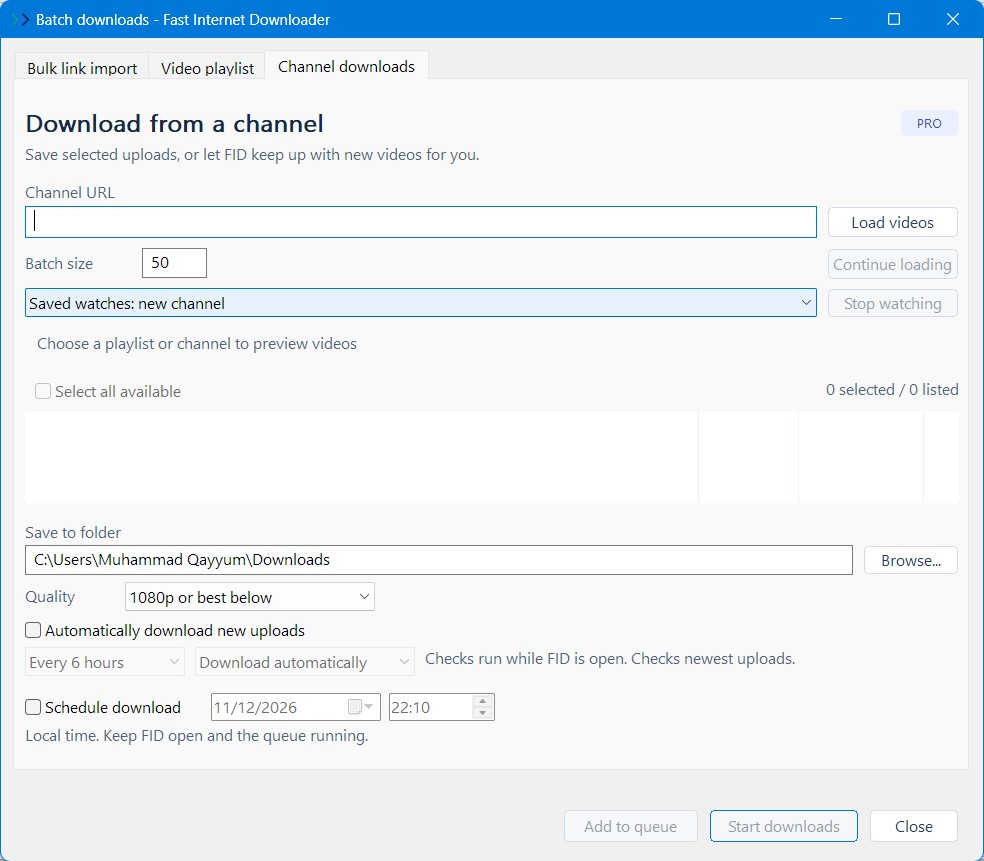
Download selected channel videos
- Open Batch → Channel downloads.
- Paste a channel URL, choose a batch size and select Load videos.
- Select the available videos you want, then choose a quality and destination.
- Start the downloads or add them to your queue.
Automatically check for new uploads
Enable Automatically download new uploads. Choose hourly, every six hours or daily checks, and decide whether new videos should download automatically or be added paused. Save the channel watch to keep those settings.
Manage saved watches
Use the Saved watches list to select a channel. Choose Stop watching when you no longer want checks. Existing downloads stay in your queue.
Keep FID open for checks
Channel watches run locally while FID is open and check the newest uploads. They are not a cloud monitoring service and do not run while your PC is off. Website support and video availability can change.
Channel downloads and watches are included in FID Pro. For a fixed collection, see playlist downloads.