
Activate FID Pro or restore a purchase
Activate the direct Windows edition with your license key, or restore FID Pro through the Microsoft Store account used to buy it.
Open Help → Registration to see your edition, app version and distribution channel. The activation method depends on whether you installed the direct EXE or the Microsoft Store edition.
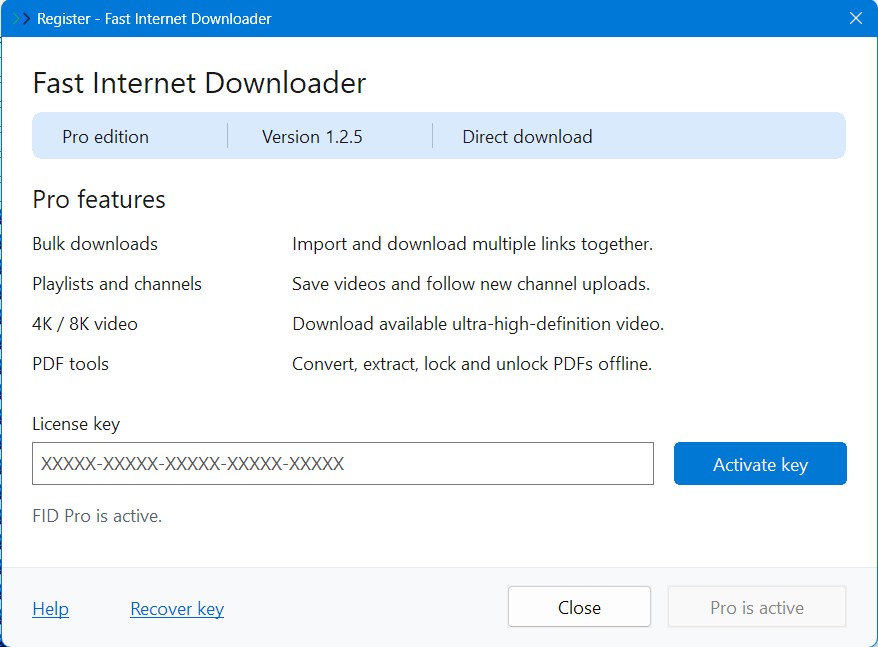
Activate the direct EXE edition
- Purchase FID Pro through the direct purchase link.
- Open Help → Registration in the direct Windows edition.
- Paste your key into License key and choose Activate key.
- Wait for confirmation that Pro is active.
The direct license costs $4.99 USD as a one-time purchase for one PC. There is no recurring subscription.
Restore a Microsoft Store purchase
Use the Microsoft account that purchased the Pro add-on. Open Help → Registration and choose Restore purchase. To buy the Store add-on, choose Activate Pro; Microsoft Store displays its price before purchase.
Lost your direct license key?
Choose Recover key in the direct edition, or use the license recovery page. Do not share your license key in screenshots or public support posts.
Activation needs an internet connection
Connect to activate or restore a purchase. The direct edition periodically revalidates its license and has a limited offline grace period. The Store edition uses Microsoft’s licensing service. Offline PDF processing does not mean activation is permanently offline.
Use the correct edition
A direct license key is entered in the direct EXE edition. Store purchases are restored through Microsoft Store. Do not assume purchases automatically transfer between the two channels.